
API keys and Claude Code
API keys are for scripts, CI and AI agents such as Claude Code. A key can do at most what you can; its role and site list narrow it further.
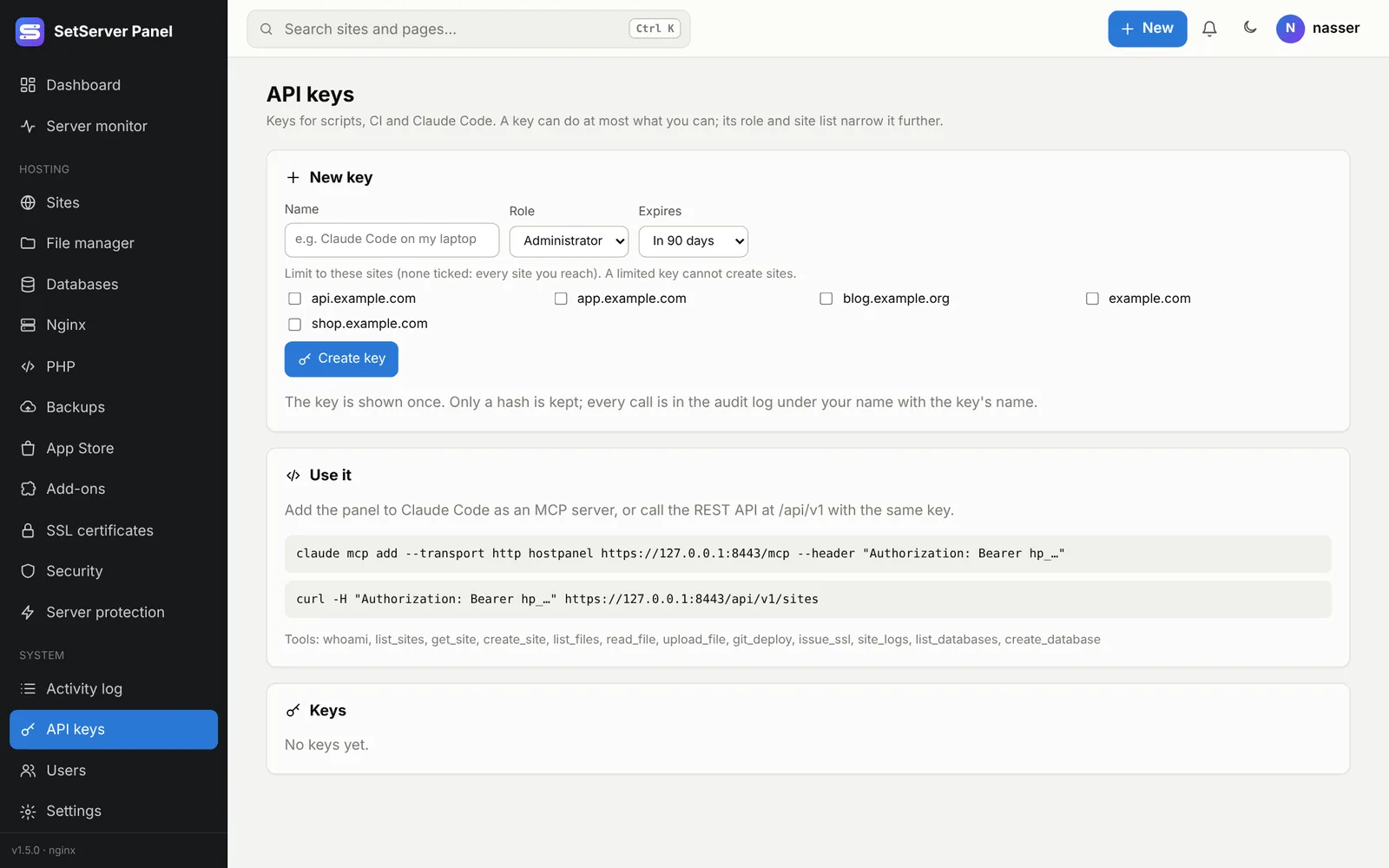
Create a key
- Open API keys (or + New → API key).
- Give it a Name, such as "Claude Code on my laptop".
- Pick a role (for example Read only for monitoring) and an expiry.
- Optionally limit it to some sites. A limited key cannot create sites.
- Press Create key. The key (
hp_…) is shown once. Only a hash is kept.
Every call is in the activity log under your name with the key's name. Revoke stops a key at once. Keys stop working while Safe Mode is on.
Claude Code (MCP)
The panel is an MCP server at https://YOUR-PANEL:8443/mcp. Add it to Claude Code with the command shown after you create a key:
claude mcp add --transport http setserver https://panel.example.com:8443/mcp \
  --header "Authorization: Bearer hp_..."
Then ask Claude in plain words, for example "list my sites and their SSL status" or "create a database called shop_db for shop.example.com". Claude uses the same operations as the API, with the key's rights.
Tools the panel offers (depending on the key's rights):
| Tool | Does |
|---|---|
whoami | The user and key, and what it may do |
list_sites, get_site, create_site | Sites |
list_files, read_file, upload_file | A site's files |
git_deploy | Deploy a site from git |
issue_ssl, ssl_status | Certificates |
site_logs | Error, access or PHP logs |
list_databases, create_database | Databases |
list_backups, backup_site | Backups |
scan_site, scan_report | The malware scanner |
list_apps, php_versions, php_settings | Apps and PHP |
list_users, audit_log | Users and the activity log |
Certificate
If you connect by IP address with the panel's self-signed certificate, Claude Code must trust it. From 1.4.3 the certificate includes the server's public IP. The cleanest way is to give the panel a real certificate on a domain: see SSL → The panel's own certificate.
REST API
The same key works with the REST API at /api/v1:
# list sites
curl -s -H "Authorization: Bearer hp_..." https://panel.example.com:8443/api/v1/sites

# create a database
curl -s -X POST -H "Authorization: Bearer hp_..." -H "Content-Type: application/json" \
  -d '{"domain":"shop.example.com","name":"shop_db"}' \
  https://panel.example.com:8443/api/v1/databases
Answers are JSON. Errors come back as {"ok": false, "error": "...", "message": "..."}. Every operation is also available by name from the command line: merp ops lists what your key may run and merp call OP key=value runs one.